The easiest way to send SMS directly from Google Sheets
Sheet SMS turns your spreadsheet into a powerful SMS sender. Send bulk texts, schedule reminders, and receive customer replies — with zero code.
✓ 50 free credits included • No credit card required • 2-minute setup
Why use Sheet SMS?
Stop exporting CSVs, wrestling with complex developer dashboards, or paying monthly fees for software you barely use.
To send SMSmanually or with complex CRMsyou need:
- ✕Export contacts & format CSVs: Download spreadsheets, clean columns, and re-upload every time (15 - 30 min)
- ✕Configure developer tools: Wrestle with Twilio API keys, webhooks, sender IDs, and code (30 - 60 min)
- ✕Copy-paste numbers & switch tabs: Move back and forth between your sheet and another portal (30 - 60 min)
- ✕Pay fixed monthly subscriptions: Charged hefty recurring fees even when you don't send
Total: 1 - 2 hours wasted per campaign
To send SMS usingSheet SMSyou need:
- ✓Keep your existing rows: Contacts stay safely in the Google Sheet or Excel file you already manage
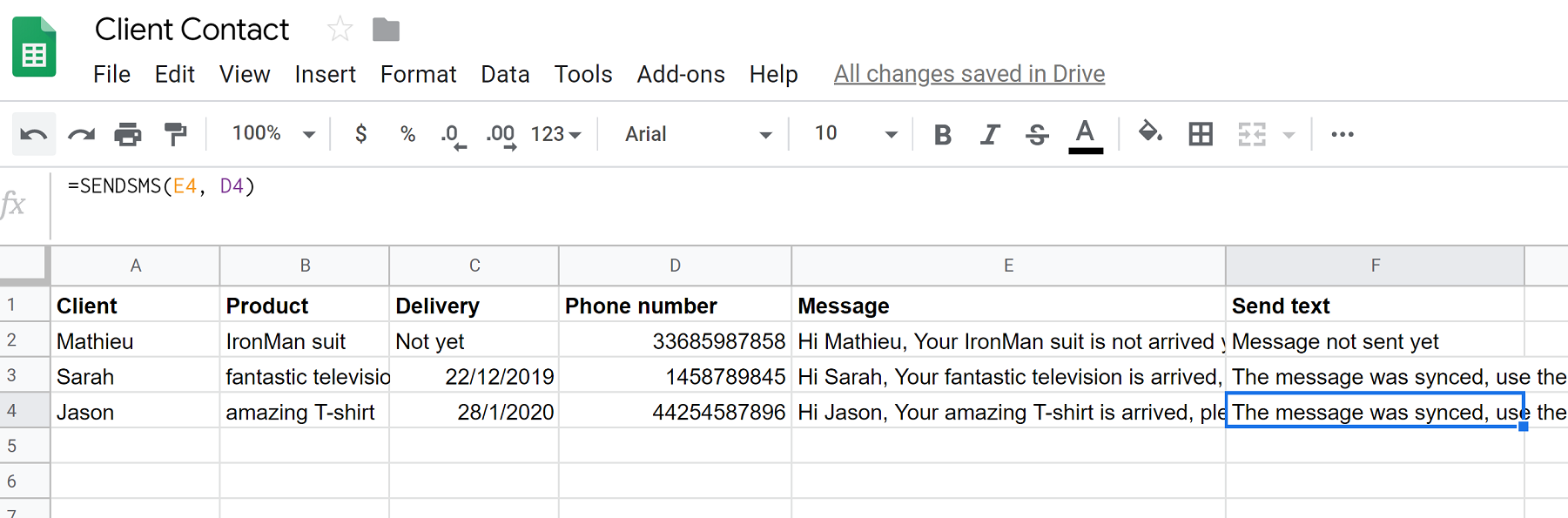
- ✓Write personalized text: Type your message or use simple formulas like
=SENDSMS(message, phone) - ✓Send or schedule in 1 click: Send immediately or schedule ahead with
=SCHEDULESMS() - ✓Real-time status & replies: Delivery confirmation and customer replies sync right back into your spreadsheet
Total: 2 minutes from the tool you already live in
You will save 10+ hours monthly on messaging & reminders!
How it Works
Four simple steps from spreadsheet to your customer's phone.
While you are doing more important things, Sheet SMS works 24/7 on autopilot.
Real messages people send every day
Clean, reliable SMS workflows powered by standard spreadsheet formulas.
See Sheet SMS in action
Watch how quickly you can install, draft, and send your first SMS directly from Google Sheets.
Try sending a message now
Test message sending directly from the web or schedule it for later.
Simple, pay-as-you-go pricing
Purchase SMS credits as you need them for Google Sheets campaigns, reminders, and alerts. No monthly subscriptions, no hidden fees. New users get $0.3 in free credits to try Sheet SMS.
Starter Pack
Perfect for small campaigns and testing.
- ~200 SMS credits in the US
- Pay as you go
- Credits never expire
- Global coverage
Value Pack
Most popular for growing businesses.
- ~400 SMS credits in the US
- Pay as you go
- Credits never expire
- Priority support
Growth Pack
Ideal for frequent campaigns and team operations.
- ~1,000 SMS credits in the US
- Pay as you go
- Credits never expire
- Priority support
Business Pack
Best value for high volume senders.
- ~2,000 SMS credits in the US
- Pay as you go
- Credits never expire
- Dedicated onboarding support
Need $250+ or custom invoice billing?
We offer custom volume packs, team balance pools, and direct invoice/wire payments for enterprises, events, clinics, and high-volume senders.
Rates start at $0.05 per SMS (US). See full price list per country.
One SMS unit is 160 GSM-7 characters.
Want setup help first? Read the tutorial or browse free SMS tools.
Trusted by Users
See what our community has to say about Sheet SMS.

"I used to spend hours every day to message all my students before classes... Today Sheet SMS allows me to contact all of them in few seconds, it is truly AWESOME!"
Martin
Teacher

"I don't even need to remember that I need to send messages, I simply integrated the functions from the add on with my schedule sheet!"
Marina
Yoga Teacher
Frequently Asked Questions
Can't find the answer you're looking for? Contact our support team.
Ready to send your first message?
Join over 100,000 users worldwide sending bulk SMS and automated reminders directly from spreadsheets.
50 free credits included • No credit card required • 2-minute setup